
Reimagining design intake through conversational UX
Reimagining design intake through conversational UX
Designing the foundation of a scalable multi-user design operations platform.
First, a little context
First, a little context
Overview
Overview
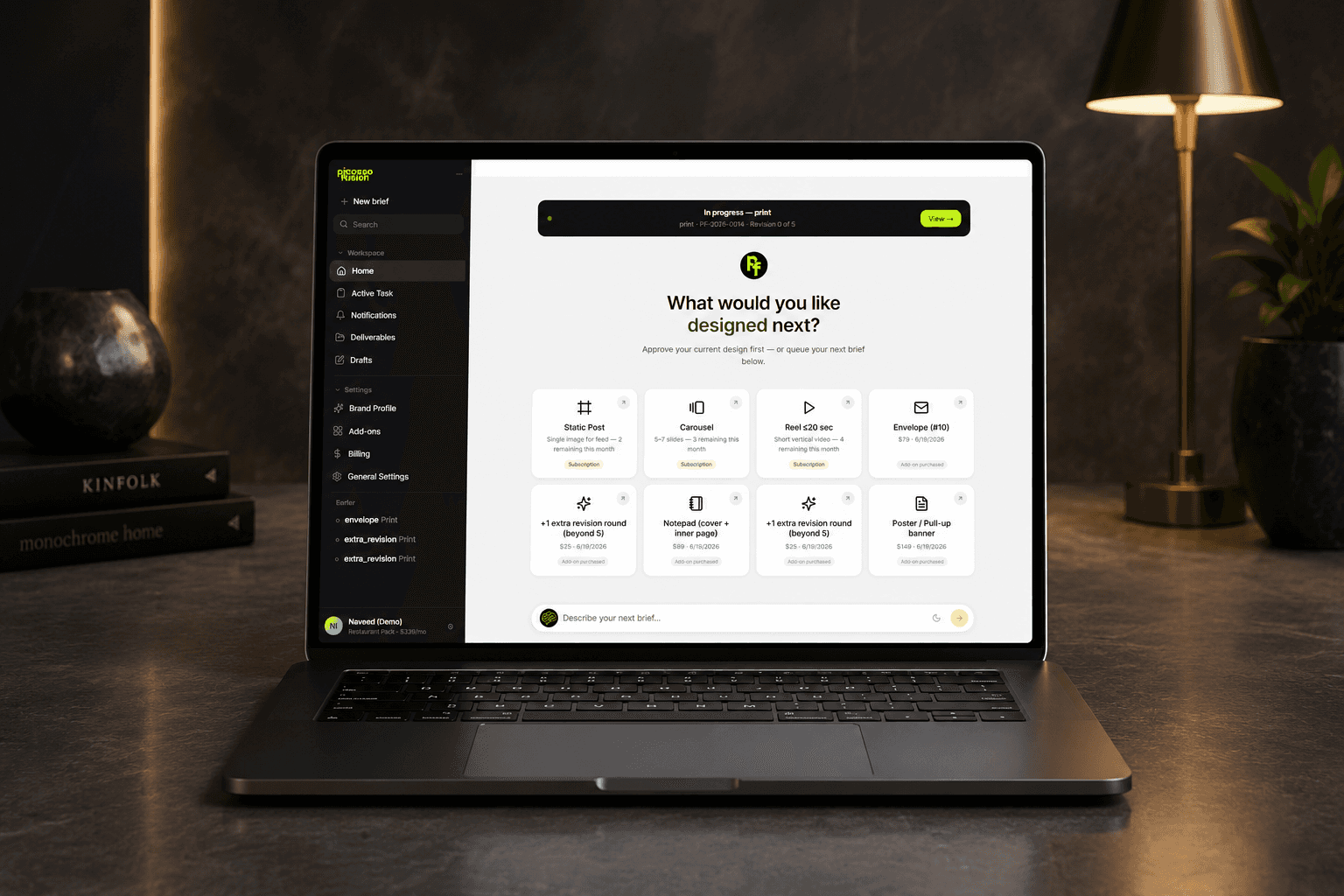
Picasso Fusion is a subscription-based design platform that enables businesses to submit, manage, and collaborate on design requests through a centralized workspace. The platform combines design operations, brand management, and AI-assisted workflows into a single system for founders, marketing teams, agencies, and enterprises.
Picasso Fusion is a subscription-based design platform that enables businesses to submit, manage, and collaborate on design requests through a centralized workspace. The platform combines design operations, brand management, and AI-assisted workflows into a single system for founders, marketing teams, agencies, and enterprises.
Project details
Project details
Time
MVP (Phase 1, months 1-4)
Tools
Figma, Claude
Scope
Web Application, responsive screens
Design Team
Design Team
UI/UX Designer (me)
Problems Identified
Problems Identified
Designing a system for a complex, multi-stage workflow involving multiple stakeholders with different goals, while maintaining clarity, control, and consistency across the lifecycle.
Designing a system for a complex, multi-stage workflow involving multiple stakeholders with different goals, while maintaining clarity, control, and consistency across the lifecycle.
Users often struggle to:
Users often struggle to:
Explain design requirements clearly
Explain design requirements clearly
Provide complete information
Provide complete information
Understand what details designers need
Understand what details designers need
Create structured briefs without back-and-forth clarification
Create structured briefs without back-and-forth clarification
Incomplete briefs lead to:
Incomplete briefs lead to:
Delays
Delays
Miscommunication
Miscommunication
Multiple revision cycles
Multiple revision cycles
Poor project visibility
Poor project visibility
My Role
My Role
Worked as part of the product design team and contributed to the design direction and execution. Product strategy and business decisions were collaborative efforts.
Worked as part of the product design team and contributed to the design direction and execution. Product strategy and business decisions were collaborative efforts.
Conversation flow design
Conversation flow design
User experience planning
User experience planning
AI interaction patterns
AI interaction patterns
Design system contribution
Design system contribution
User flow mapping
User flow mapping
Feature prioritization for MVP
Feature prioritization for MVP
Collaboration with stakeholders and development team
Collaboration with stakeholders and development team
Opportunity
Opportunity
Most subscription design services solve the design execution problem but not the operational complexity surrounding it.
As businesses grow, design requests become fragmented across emails, chats, spreadsheets, project boards, and multiple stakeholders. This creates challenges in visibility, collaboration, accountability, and brand consistency. There was an opportunity to create a centralized platform that streamlines the entire design request lifecycle while providing a foundation for future AI-powered automation.
Most subscription design services solve the design execution problem but not the operational complexity surrounding it.
As businesses grow, design requests become fragmented across emails, chats, spreadsheets, project boards, and multiple stakeholders. This creates challenges in visibility, collaboration, accountability, and brand consistency. There was an opportunity to create a centralized platform that streamlines the entire design request lifecycle while providing a foundation for future AI-powered automation.
Phase 1 Scope
Phase 1 Scope
The first release focused on validating the core workflow from request creation to delivery.
The first release focused on validating the core workflow from request creation to delivery.
Brand Information Collection
Brand Information Collection
Capture brand context, assets, and preferences during onboarding.
Capture brand context, assets, and preferences during onboarding.
Design Request Workflow
Design Request Workflow
Transform conversation outputs into ready-to-execute design requests.
Transform conversation outputs into ready-to-execute design requests.
Task Management
Task Management
Allow users to monitor submitted requests and their status.
Allow users to monitor submitted requests and their status.
Design Constraints
Design Constraints
MVP-first approach
MVP-first approach
Prioritize core request management flows while deferring advanced capabilities.
Prioritize core request management flows while deferring advanced capabilities.
Multi-user architecture
Multi-user architecture
Future organization management and permissions were not yet available.
Future organization management and permissions were not yet available.
Scalability
Scalability
Architect experiences that can expand without major redesigns.
Architect experiences that can expand without major redesigns.
Future Phases
Future Phases
Although Phase 1 focused on core functionality, the information architecture was intentionally built to support future expansion, including:
Although Phase 1 focused on core functionality, the information architecture was intentionally built to support future expansion, including:
Organization workspaces
Organization workspaces
Multiple staff members
Multiple staff members
Role-based permissions
Role-based permissions
Multi-brand management
Multi-brand management
Approval workflows
Approval workflows
Enterprise reporting
Enterprise reporting
AI Brand Memory
AI Brand Memory
AI Quality Assurance
AI Quality Assurance
Understanding The Market
Understanding The Market
By evaluating leading competitors, I uncovered common pain points in request management, collaboration, and progress tracking. These findings became the foundation for prioritizing features and shaping the overall product experience using AI.
By evaluating leading competitors, I uncovered common pain points in request management, collaboration, and progress tracking. These findings became the foundation for prioritizing features and shaping the overall product experience using AI.

Key Findings & Market Gaps
Key Findings & Market Gaps

Product Gap
Product Gap
Most competitors focus on delivering design services. Picasso Fusion focuses on managing design operations at scale.
Most competitors focus on delivering design services. Picasso Fusion focuses on managing design operations at scale.
Limited organizational support
Limited organizational support
Poor stakeholder management
Poor stakeholder management
Minimal AI integration
Minimal AI integration
Lack of brand intelligence
Lack of brand intelligence
Information Architecture
Information Architecture
Although Phase 1 focused on core functionality, the information architecture was intentionally built to support future expansion, including:
Although Phase 1 focused on core functionality, the information architecture was intentionally built to support future expansion, including:

User Journey
User Journey
Looking beyond tasks and actions, this exercise revealed the emotional journey behind the workflow. Understanding user frustrations and motivations helped shape design decisions that make the process feel more transparent, efficient, and user-friendly.
Looking beyond tasks and actions, this exercise revealed the emotional journey behind the workflow. Understanding user frustrations and motivations helped shape design decisions that make the process feel more transparent, efficient, and user-friendly.

Design System
Design System
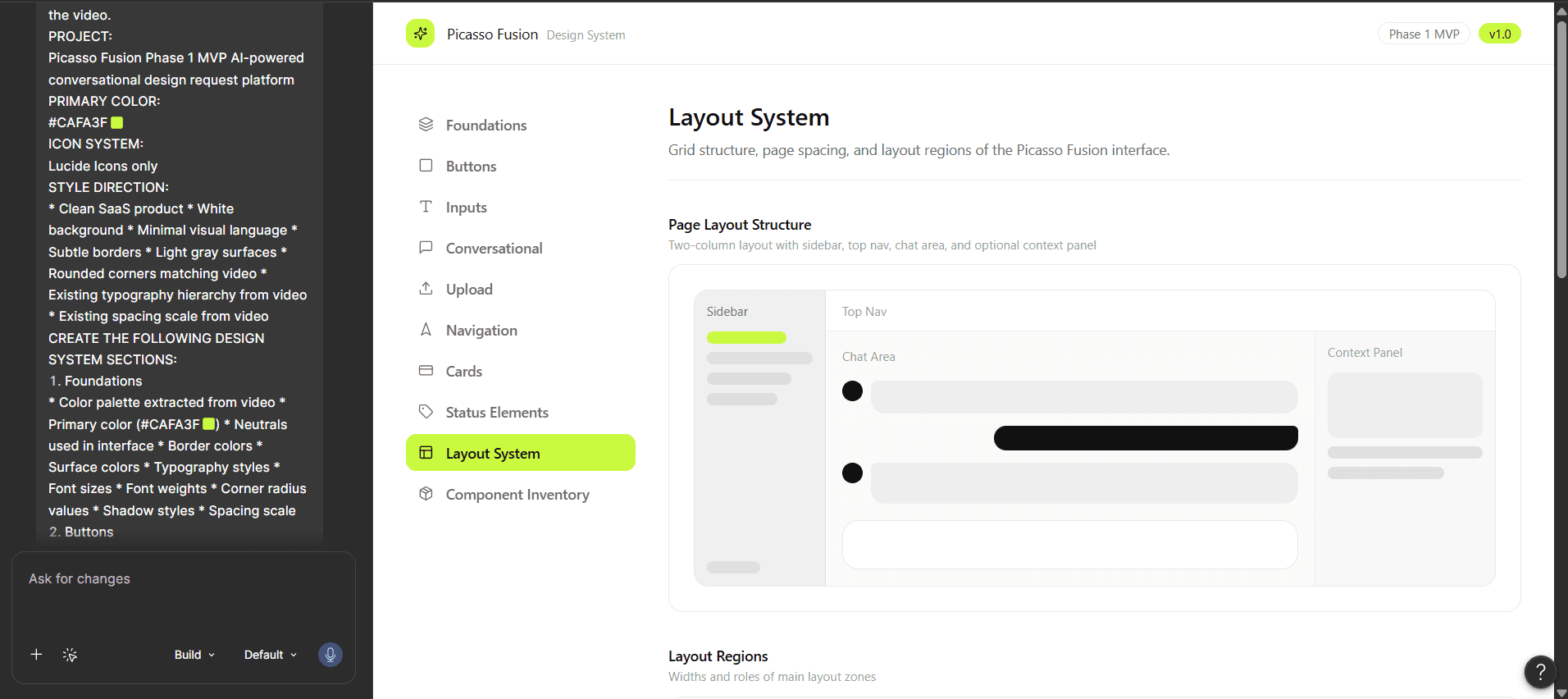
To accelerate the initial setup of the design system, I leveraged Figma Make to generate foundational components, typography scales, spacing tokens, and color styles. This allowed me to rapidly explore system structures and focus my effort on refining patterns, usability, and implementation considerations.
To accelerate the initial setup of the design system, I leveraged Figma Make to generate foundational components, typography scales, spacing tokens, and color styles. This allowed me to rapidly explore system structures and focus my effort on refining patterns, usability, and implementation considerations.
Decision Making
Decision Making
While leveraging the AI-generated design system as a starting point, I refined several visual and interaction patterns to better align with the product's needs. These refinements helped improve usability, visual consistency, and scalability accessibility across the platform.
While leveraging the AI-generated design system as a starting point, I refined several visual and interaction patterns to better align with the product's needs. These refinements helped improve usability, visual consistency, and scalability accessibility across the platform.
Key changes included introducing a dark-themed navigation bar to improve visual hierarchy
Key changes included introducing a dark-themed navigation bar to improve visual hierarchy
Updating secondary buttons with neutral grey styling to create clearer action prioritization
Updating secondary buttons with neutral grey styling to create clearer action prioritization
Replacing static icons with animated variants to enhance engagement and feedback
Replacing static icons with animated variants to enhance engagement and feedback
Rationalizing the status label system by reducing excessive color usage and establishing a more consistent semantic color mapping
Rationalizing the status label system by reducing excessive color usage and establishing a more consistent semantic color mapping
Prototyping Approach
As part of the ideation process, I utilized Figma Make to generate workable wireframes, allowing me to quickly visualize concepts and iterate on solutions while focusing on refining the user experience and product requirements.
As part of the ideation process, I utilized Figma Make to generate workable wireframes, allowing me to quickly visualize concepts and iterate on solutions while focusing on refining the user experience and product requirements.
Design & UX decisions
Phase 1 took the approach as a chat system.
Because design requests move through three distinct groups, the client submitting, the internal team managing capacity, and the designer executing the platform needed three purpose built experiences rather than one generic dashboard. Each portal is scoped to what that role actually needs to see and act on.
Phase 1 took the approach as a chat system.
Because design requests move through three distinct groups, the client submitting, the internal team managing capacity, and the designer executing the platform needed three purpose built experiences rather than one generic dashboard. Each portal is scoped to what that role actually needs to see and act on.
Client Screens
Client Screens
New Brief
New Brief

Guided Conversation Instead of a Form
Guided Conversation Instead of a Form
Breaking the brief into one question at a time makes the experience feel less overwhelming and helps users complete briefs with greater confidence.
Breaking the brief into one question at a time makes the experience feel less overwhelming and helps users complete briefs with greater confidence.
Live Progress & Brief Summary
Live Progress & Brief Summary
A persistent progress tracker and real-time summary reassure users that they're on track while allowing them to verify information without leaving the flow.
A persistent progress tracker and real-time summary reassure users that they're on track while allowing them to verify information without leaving the flow.
Contextual Input Options
Contextual Input Optinons
Relevant actions such as uploading an image, using stock assets, or relying on brand elements appear only when needed, keeping the interface focused and reducing unnecessary choices.
Relevant actions such as uploading an image, using stock assets, or relying on brand elements appear only when needed, keeping the interface focused and reducing unnecessary choices.
Brand profile
Brand profile

Centralized Brand Profile
Centralized Brand Profile
Brand assets, typography, colors, tone, and audience are stored in one place, creating a single source of truth for every design request.
Brand assets, typography, colors, tone, and audience are stored in one place, creating a single source of truth for every design request.
Profile-Driven Automation
Profile-Driven Automation
Once the profile is complete, future briefs are automatically pre-filled with brand information, reducing repetitive input and ensuring consistency across deliverables.
Once the profile is complete, future briefs are automatically pre-filled with brand information, reducing repetitive input and ensuring consistency across deliverables.
Editable Without Disruption
Editable Without Disruption
Users can review and update their brand profile at any time, allowing the system to evolve with changing brand guidelines while keeping existing workflows simple.
Users can review and update their brand profile at any time, allowing the system to evolve with changing brand guidelines while keeping existing workflows simple.
Add Ons
Add Ons

Transparent Order Review
Transparent Order Review
Before payment, users can review the add-on details, pricing, and purpose in one place, reducing uncertainty and preventing accidental purchases.
Before payment, users can review the add-on details, pricing, and purpose in one place, reducing uncertainty and preventing accidental purchases.
Focused Checkout Experience
Focused Checkout Experience
The payment card highlights the total cost and primary action while minimizing secondary options, helping users complete the purchase without distractions.
The payment card highlights the total cost and primary action while minimizing secondary options, helping users complete the purchase without distractions.
Clear Billing Context
Clear Billing Context
The interface clearly communicates that add-ons are billed separately and don't affect the monthly subscription, setting the right expectations before confirmation.
The interface clearly communicates that add-ons are billed separately and don't affect the monthly subscription, setting the right expectations before confirmation.
Design Inprogress
Design Inprogress

Real-Time Task Visibility
Real-Time Task Visibility
The workspace clearly communicates the current design status, helping users understand where their request is in the delivery process without needing to follow up.
The workspace clearly communicates the current design status, helping users understand where their request is in the delivery process without needing to follow up.
Contextual Collaboration
Contextual Collaboration
Live chat, annotations, and revision history are integrated alongside the design, enabling feedback to happen within the same workspace instead of across multiple channels.
Live chat, annotations, and revision history are integrated alongside the design, enabling feedback to happen within the same workspace instead of across multiple channels.
Brief & Asset Reference
Brief & Asset Reference
Project specifications remain accessible throughout the review process, allowing users to validate the final design against the original brief without switching screens.
Project specifications remain accessible throughout the review process, allowing users to validate the final design against the original brief without switching screens.
Deliverables
Deliverables

Centralized Deliverable Hub
Centralized Deliverable Hub
All final assets, completion details, and revision actions are grouped into a single workspace, eliminating the need to search across emails or chats.
All final assets, completion details, and revision actions are grouped into a single workspace, eliminating the need to search across emails or chats.
Clear Next Actions
Clear Next Actions
Primary actions such as viewing files or requesting revisions are surfaced immediately, helping users continue their workflow without unnecessary navigation.
Primary actions such as viewing files or requesting revisions are surfaced immediately, helping users continue their workflow without unnecessary navigation.
Traceable Project Lifecycle
Traceable Project Lifecycle
The delivery screen preserves project history, files, and completion status, making it easy for users to revisit past work and manage future iterations.
The delivery screen preserves project history, files, and completion status, making it easy for users to revisit past work and manage future iterations.
Admin
Admin
Designed an operational dashboard that enables administrators to manage users, projects, pricing, and platform workflows from a centralized interface, improving visibility, control, and operational efficiency.
Designed an operational dashboard that enables administrators to manage users, projects, pricing, and platform workflows from a centralized interface, improving visibility, control, and operational efficiency.
Dashboard
Dashboard

Operational Visibility
Operational Visibility
Key platform metrics are surfaced in a single dashboard, enabling administrators to monitor platform performance and identify priorities at a glance.
Key platform metrics are surfaced in a single dashboard, enabling administrators to monitor platform performance and identify priorities at a glance.
Scalable Monitoring
Scalable Monitoring
The dashboard is designed to accommodate growing users, projects, and platform activity without increasing complexity.
The dashboard is designed to accommodate growing users, projects, and platform activity without increasing complexity.
Project Management
Project Management

Centralized Project Oversight
Centralized Project Oversight
Projects are consolidated into a single workspace, making it easier to monitor progress, assignments, and delivery status.
Projects are consolidated into a single workspace, making it easier to monitor progress, assignments, and delivery status.
Efficient Task Prioritization
Efficient Task Prioritization
Advanced filters and status indicators help administrators quickly identify projects that need intervention or follow-up.
Advanced filters and status indicators help administrators quickly identify projects that need intervention or follow-up.
Brief Question Builder
Brief Question Builder

Configurable Conversation Flow
Configurable Conversation Flow
Administrators can create and manage briefing questions without developer support, making the system adaptable to evolving business needs.
Administrators can create and manage briefing questions without developer support, making the system adaptable to evolving business needs.
Reusable Question Framework
Reusable Question Framework
Questions are structured as reusable components, ensuring consistency across different creative brief types.
Questions are structured as reusable components, ensuring consistency across different creative brief types.

Configurable Conversation Flow
Administrators can create and manage briefing questions without developer support, making the system adaptable to evolving business needs.
Reusable Question Framework
Questions are structured as reusable components, ensuring consistency across different creative brief types.
Staff Management
Staff Management

Role-Based Administration
Role-Based Administration
Permissions and responsibilities are organized by role, ensuring team members have access to the tools they need.
Permissions and responsibilities are organized by role, ensuring team members have access to the tools they need.
Improved Resource Allocation
Improved Resource Allocation
Clear visibility into staff assignments enables administrators to distribute work more effectively and balance workloads.
Clear visibility into staff assignments enables administrators to distribute work more effectively and balance workloads.
Designer Portal
Designer Portal
Designed a dedicated workspace that streamlines the designer workflow by centralizing task management, creative briefs, collaboration, and SLA tracking, enabling teams to deliver projects more efficiently.
Designed a dedicated workspace that streamlines the designer workflow by centralizing task management, creative briefs, collaboration, and SLA tracking, enabling teams to deliver projects more efficiently.
Queue
Queue

Prioritized Work Intake
Prioritized Work Intake
Incoming design requests are consolidated into a single queue, giving designers a clear starting point without switching between multiple communication channels.
Incoming design requests are consolidated into a single queue, giving designers a clear starting point without switching between multiple communication channels.
Assignment Board
Assignment Board
Assignment Board

Centralized Work Allocation
Centralized Work Allocation
Unassigned requests are organized in one workspace, enabling managers to distribute tasks efficiently across the design team.
Unassigned requests are organized in one workspace, enabling managers to distribute tasks efficiently across the design team.
SLA Monitor
SLA Monitor

Proactive SLA Tracking
Proactive SLA Tracking
Tasks are categorized as On Track, At Risk, or Breached, allowing teams to identify potential delays before deadlines are missed.
Tasks are categorized as On Track, At Risk, or Breached, allowing teams to identify potential delays before deadlines are missed.

Comprehensive Design Context
Comprehensive Design Context
The complete creative brief and brand snapshot are presented within a single workspace, allowing designers to understand requirements without switching between multiple tools or documents.
The complete creative brief and brand snapshot are presented within a single workspace, allowing designers to understand requirements without switching between multiple tools or documents.
Contextual Communication
Contextual Communication
Clarification requests and internal notes are embedded directly into the task, ensuring client conversations and team discussions remain linked to the project context.
Clarification requests and internal notes are embedded directly into the task, ensuring client conversations and team discussions remain linked to the project context.
Other Projects


Available for work
- Let’s Connect
I am open for
Full-Time roles.
Nivethaarul © 2026.
Available for work
- Let’s Connect
I am open for
Full-Time roles.
Nivethaarul © 2026.
Available for work
- Let’s Connect
I am open for
Full-Time roles.
Nivethaarul © 2026.
Available for work
- Let’s Connect
I am open for
Full-Time roles.
Nivethaarul © 2026.
Available for work
- Let’s Connect
I am open for
Full-Time roles.
Nivethaarul © 2026.
Available for work
- Let’s Connect
I am open for
Full-Time roles.
Nivethaarul © 2026.